The place where everyone hangs out, chats, gossips, and argues
By iSeb
#148542
lmao.... im sorry i have to agree with dickie here. get a life
(i know that rich me talking.)

Seb : )
User avatar
By tombugler
#148543
I'm not a stalker, if I was i would probably be asleep on the step of broadcast house waiting for moyles & crew to arrive 2moro morning. I'm just a fan, same as u lot.
By LastChanc
#148549
I suppose it could be worse, imagine if you will, the phone rings and it's Dom reading the weather... *shakes head* And in the north today, it's sunny with a slight chance of showers...
User avatar
By tombugler
#148553
um... my message tone goes, "Dank, Muggy, Dank Dank Muggy"
By Mcqueen_
#148982
What's the best way to convert .ra to .mp3?

RealOne needs an upgrade to use the 'Premium feature' apparently. Anyway to get around this or another free method.
By Dickie
#149010
Or you can just playback the .ra file with your PC set to record the stereo mix output and Adobe Audition does the rest.
By Mcqueen_
#149012
But that can't be the best way, can it? Surely some quality is lost that way.

Plus I have large files to convert (one file nearly 5hours..) - so would be better if I could get some decent software I can set to convert the files.
By Dickie
#149017
Believe me, you'll do more damage running the file through filters to convert it than you will recording it via the way i said, i've done it with loads of interviews of R1 Online, moyles' shows, and Audio from stand-up DVD's and the recordings sound just as good as the originals.

Give it a whirl mate, though i would advise turning of your system sound effects as the recording will have every sound that your pc makes.
User avatar
By tombugler
#149019
use CD:EX, that's the best conversion software I have found and it retains the quality.
By jimmy g
#149075
What's the best way to convert .ra to .mp3?

RealOne needs an upgrade to use the 'Premium feature' apparently. Anyway to get around this or another free method.

Find an old version of Streambox Ripper. Real banned it a few years ago but you can sometimes find it floating around the net. I will try to dig it out sometime.
By Dickie
#149078
Downloaded Streambox Ripper, but it doesn't support the latest encoding of Real Audio files, only the old G2 player.

Image
By Mcqueen_
#149080
Downloaded Streambox Ripper, but it doesn't support the latest encoding of Real Audio files, only the old G2 player.


I didn't get that.

The quality is really bad though, I'm just messing pressing random stuff trying to see if I can make it any better.
By Dickie
#149081
what's the easy way. and don't say download real player because i already have it.
By Eddie
#149082
I'm not a stalker, if I was i would probably be asleep on the step of broadcast house waiting for moyles & crew to arrive 2moro morning. I'm just a fan, same as u lot.


If you did wait there you'd be waiting a long time as Radio 1 isn't at broadcasting house, it's about a quarter of a mile away at Yalding house.
User avatar
By fish heads
#149084
He's not a crazy stalker - he just F**king loves Schalabrities.
By Sionide
#149091
um... my message tone goes, "Dank, Muggy, Dank Dank Muggy"


stop it!! stop it please, you're tearing me apart... rofl
By jimmy g
#149101
Downloaded Streambox Ripper, but it doesn't support the latest encoding of Real Audio files, only the old G2 player.


I didn't get that.

The quality is really bad though, I'm just messing pressing random stuff trying to see if I can make it any better.

The quality isn't particularly good (you need to use higher than they recommend) but it is much quicker than real time. The best quality would just to be recording a very high quality MP3 / wav as you play it then compress it if you need to. Just because something is 32k (for example) .ra doesn’t mean you can get away with a 64k mp3.
By gooooooodmorning
#149260
Found this off a website
To get past the problem with streambox ripper go to
C:--->Program Files-->Common Files--->Real--->Codecs
Within this folder copy the file 'cook.dll', then paste this file into the same folder, rename this file to 'cook3260.dll'. So now you should have both a Cook.dll file and a cook3260.dll file. This, in most cases, should eliminate the problem.
By Dickie
#149261
Thanks, that works.

You're a legend.
By gooooooodmorning
#149272
Why thank you, high praise indeed, as you are such a legend yourself.
By Mcqueen_
#150421
Instead of starting a new thread I might aswell post here.

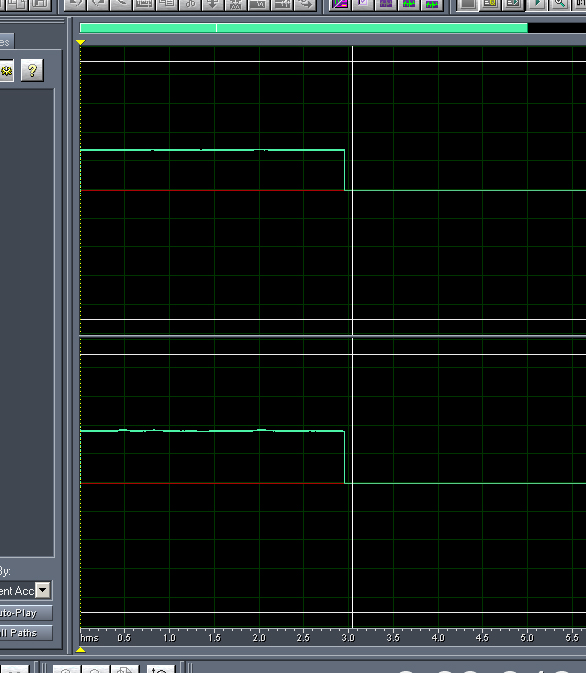
Anyone any idea why when I record the output from my computer it goes like this.

Image

This is with no sounds. It was working, then suddenly changed without me messing with anything.
By Dickie
#150422
SO you've got 'Stereo Mix' selected in the Windows Mixer?
By Dickie
#150424
Have you checked the 'Device Order' & 'Device Order' settings in the Options on the toolbar?

What's the recording like from a line-in source?